CENTURISTIME · ATTENDANCE & PAYROLL
From device records to employee payslips.
Import attendance, review late arrivals and missing punches, and calculate payroll. A Windows application in English and Arabic, with employee records on your computer.
For managers who review attendance and prepare payroll
Windows 10 / 11 · 30 days free · No card required
CenturisTime
Watch the recorded product tour
A recorded walkthrough of the app, using sample records. Pause to inspect any screen.
- Start with the records that need review
- Review attendance and correct exceptions
- Review pay before finalizing
From device records to employee statements
-
Import device records
Connect a compatible network device or load a supported attendance file.
-
Review attendance
Check hours, overnight shifts, and missing punches. Correct records that need review.
-
Calculate and review
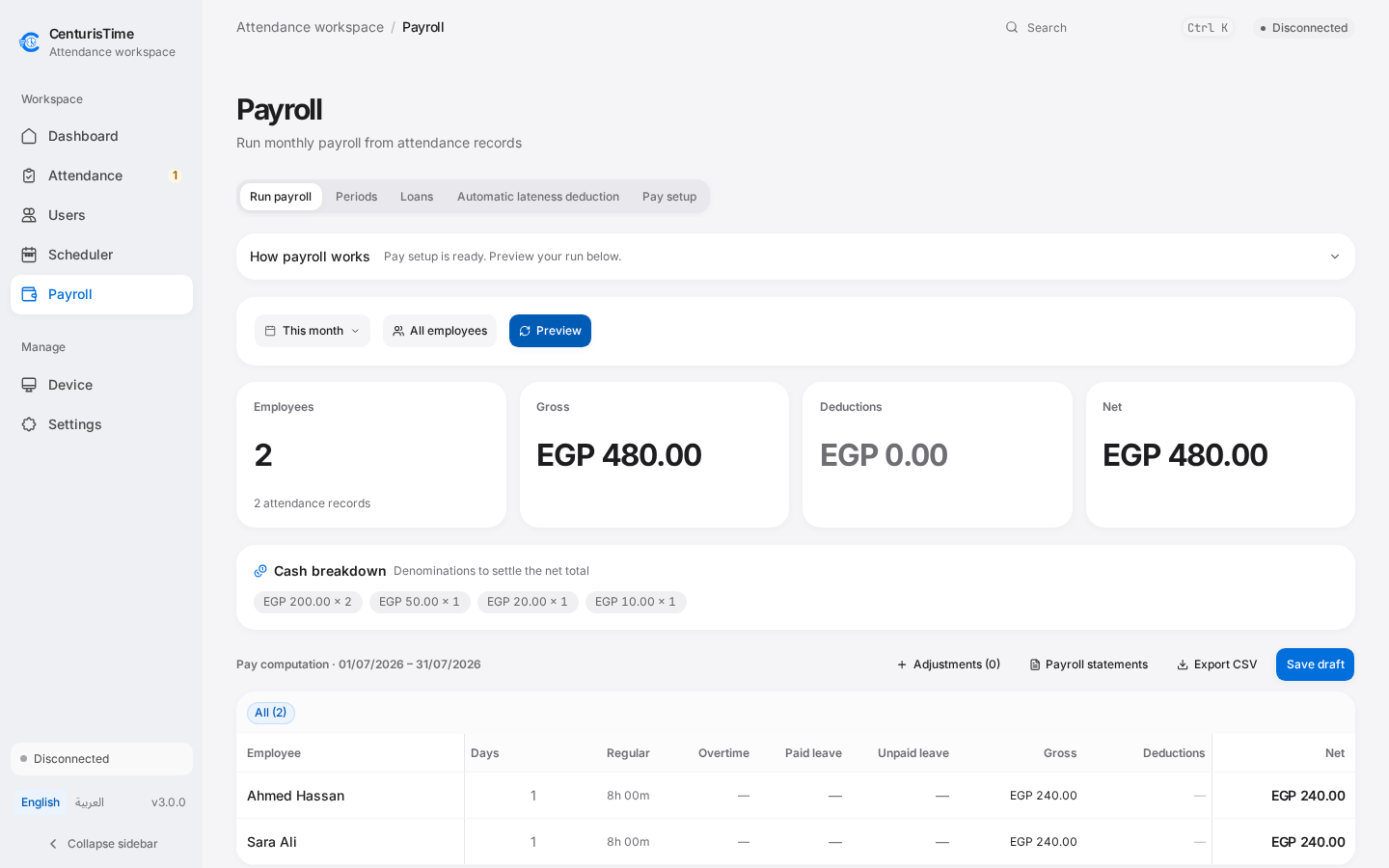
Apply salary rules, deductions, and adjustments. Review the draft before finalizing.
-
Record and export
Record payments and prepare an English or Arabic PDF for each employee.
A working day, step by step
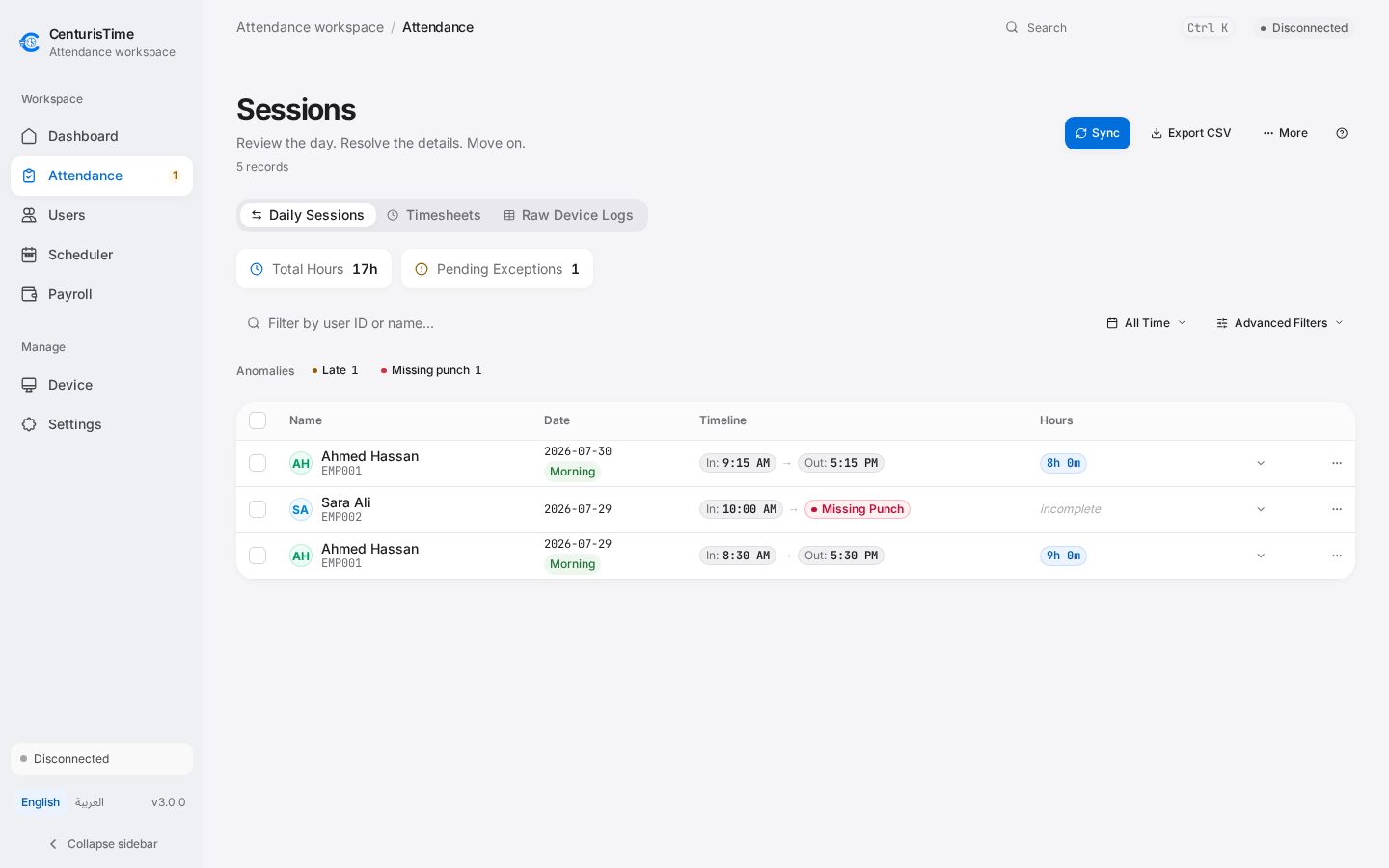
Start with the records that need review
Use the daily overview to open attendance, schedules, or device setup for the next task.
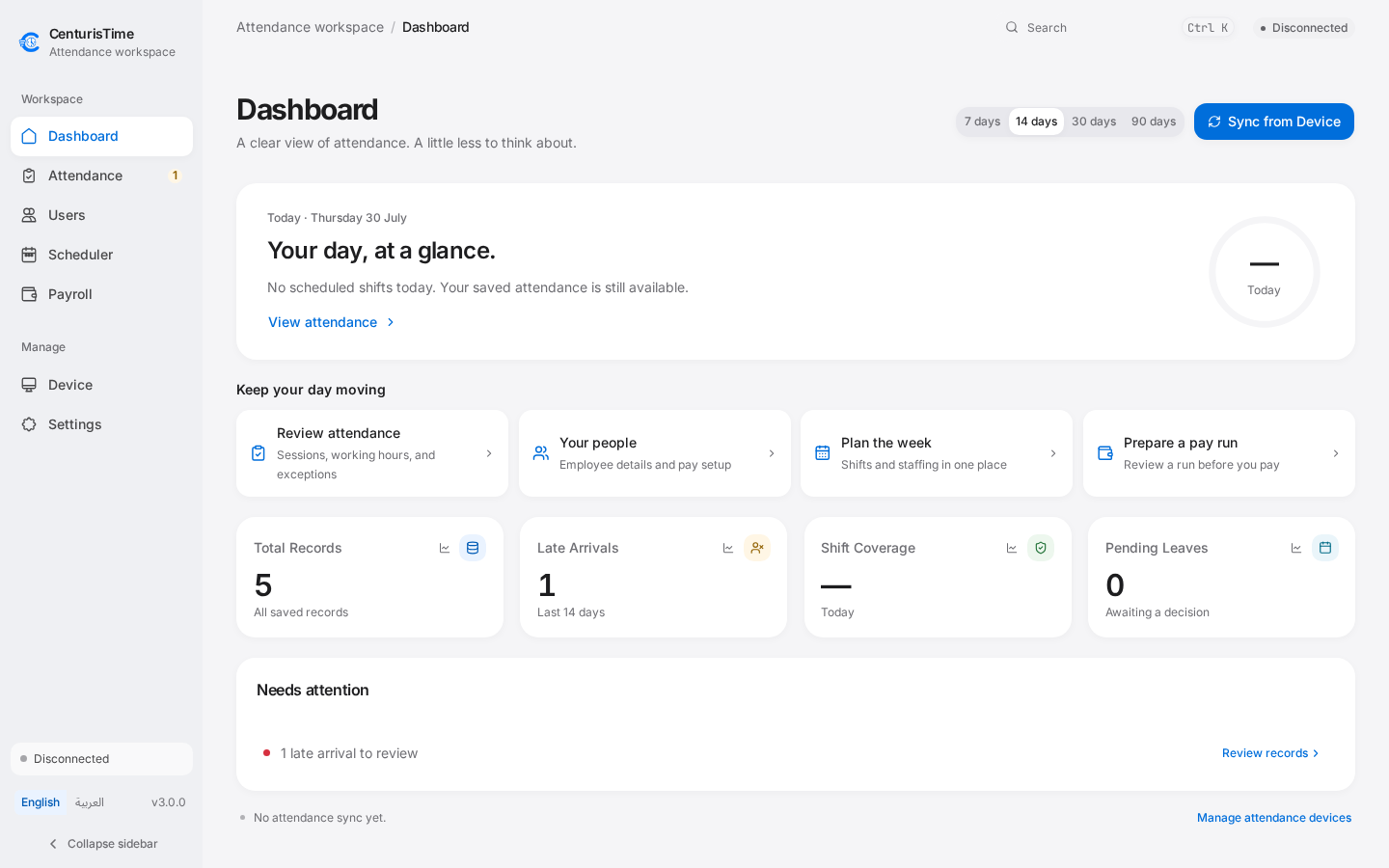
Review attendance and correct exceptions
Check punches and worked hours. Open an incomplete record before using it in payroll.
Review pay before finalizing
See earnings, deductions, and net pay for each employee. Review the draft, then finalize, record payment, and prepare PDFs.
Release interface with fictional sample records. Recorded in a browser; native hardware is not shown.
BROWSER SAMPLE
Review attendance before it reaches payroll.
A simplified review screen with fictional employees. Open the punch details, approve a record, or excuse an exception. Changes stay in this page and do not affect payroll.
Daily Sessions
Open the punches, approve a record, or excuse an exception. These actions affect only the sample.
Review attendance before you finalize payroll
Device attendance records
Pull records from a compatible device or import supported files, then review clock-in and clock-out punches.
Corrections and review
Check lateness and missing punches. Correct records or restore deleted sessions when needed.
Schedules and leave
Set shift rules and leave. Overnight shifts remain linked across midnight.
Payroll calculations
Review wages, deductions, adjustments, and loans. Finalized periods protect their attendance inputs.
Employee PDFs
Prepare branded English or Arabic statements and record paid and outstanding amounts.
Local records
Attendance and payroll stay on your computer. Keep regular backups of your data.
Check your attendance device before you buy
Compatibility depends on the device model, firmware, and connection method. Send us those details so we can check your setup.
Local network
Compatible devices connect over the office network. You need the device IP, port, and communication password if configured.
USB file import
Import supported attendance exports when a network connection is unavailable. Send a sample export to check its format.
Confirm the exact model
Ask us to confirm your device model and firmware before purchasing.
CenturisTime
Try it on the computer your team uses
Use your own products or attendance records during the 30-day trial. No card required.
On your phone? Open this page on your Windows computer, or message us for the download link and setup help.
See license terms and request pricing- Version
- CenturisTime3.0.0
- Released
- Windows installer
- 13.5MB · x64
- Windows 10 / 11
- English and Arabic
Installer verification
The updater verifies a Tauri signature. These installers do not yet have Windows publisher signing (Authenticode).
Installer SHA-256
c1cc36b864e23ba302b5b318462d06a7e705ef86254e3c72deba39725a826886Before you install
Does it calculate salaries or only export hours?
CenturisTime includes payroll calculation from attendance, salary rules, adjustments, and deductions. Review the result before finalizing a period, record payments, and export employee PDF statements.
Does it handle overnight shifts?
Scheduled attendance can cross midnight. The app keeps that shift together for review and payroll rather than splitting it into unrelated calendar days.
Can I use it without internet?
Attendance review and payroll use records stored on your computer. Pulling device records needs a reachable local device or a supported import file. Account, update, and optional sharing services need internet.
Is this a complete HR or tax filing system?
The app covers attendance, schedules, leave, and payroll preparation. Your business remains responsible for reviewing its salary rules and meeting applicable tax and employment requirements.